How to Check a Partition for Errors and Bad Sectors
How can you determine whether a disk partition contains file system errors or bad sectors? Bad sectors are physical or logical areas on a storage device that can no longer reliably store or retrieve data. When these issues occur, the affected space becomes unusable, and any data written to it may become corrupted or lost.
Continuing to use a partition with underlying disk errors increases the risk of data loss, system instability, and file corruption. Therefore, it is important to regularly scan your partitions to detect and repair potential issues early.
To verify the health of a partition, you can use IM-Magic Partition Resizer. This tool allows you to scan the selected partition for file system errors and bad sectors, and helps repair detected issues to improve disk reliability and data safety.
How to Check Partition Errors?
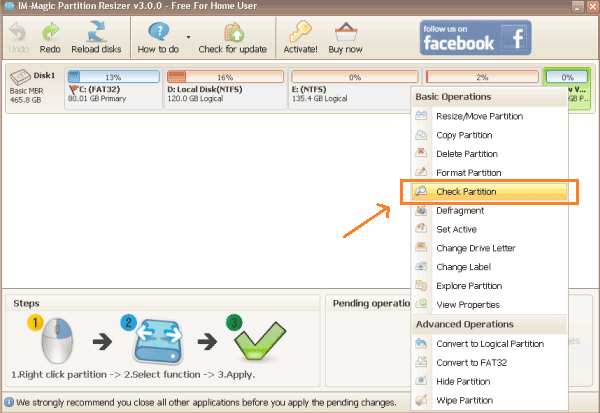
Step1. Right click the partition that you want to check and select "Check Partition" option.
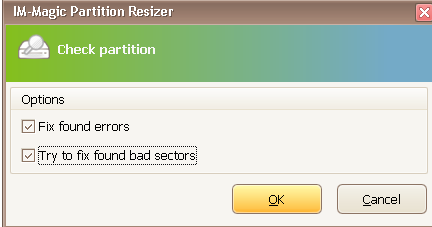
Step2. Select the options to check the selected partition and click "OK" button. You can choose one or two in the following options:
- Fix found error
- Try to fix found bad sectors
Step3. Wait patiently when it is checking partition for error. Then, you can click "Close" button when security descriptor verification completed.
For Windows 11/10/8/7 => Download Partition Resizer Free [100% Free]
For Windows Server 2025-2003 => Download Partition Resizer Server [Trial]